PikaColor
A downloadable tool for Windows
PikaColor (pick a color) is a simple eyedropper that lets you grab the color of any pixel on your screen and get its hex code. No installation required.
How to use
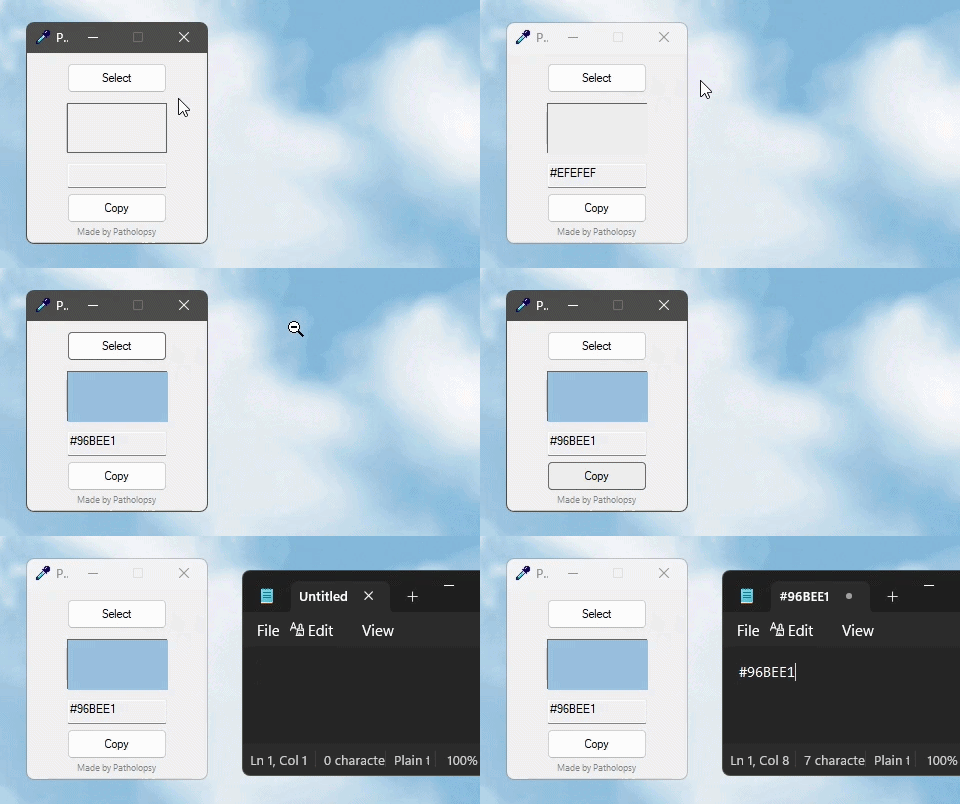
- Select button to activate the eyedropper (press ESC key to cancel).
- Click on a color on your screen.
- Copy button to get the color code
- Paste it anywhere, like in your drawing software.
→ PikaColor stays in the foreground at all times.
Q&A
- Will you add more features?
This tool was built for my own needs. I don't plan on adding new features. - 32-bit or 64-bit version?
64-bit: for most modern computers.
32-bit: only if you're running an older system. - How do I know which version to use?
A 32-bit version of Windows can't run 64-bit software.
To check your system version:
Settings → System → About (at the very bottom) → System Type. - What is your favorite coffee?
Mochaccino.
Stay in touch
- Follow me on Twitter.
Download
Leave a comment
Log in with itch.io to leave a comment.